Prices & currency
Set your menu currency, choose how prices are formatted (like €19.00 or 19,00 €), control decimal places, or hide menu prices entirely for tasting menus.
Each item's price is shown in your venue's currency, formatted to match your region. You set these once on the Venue page, in the Currency and number format card, and they apply across your whole menu. The card shows an example price as you change the settings.
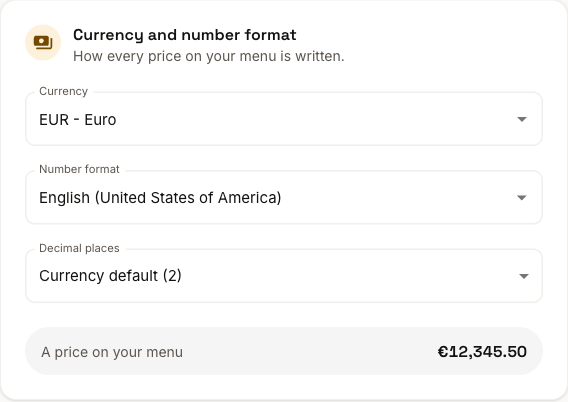
Currency
Choose your currency (for example, EUR). Every price on your menu uses this currency: each menu has a single currency.
Number format
The number format controls how prices are written. The same price can display differently depending on the format, for example €19.00 versus 19,00 €. Pick the one that matches how your guests expect to see prices.
Some formats, such as Hungarian, Spanish, and Polish, only add a thousands separator from 10,000 up, so they write 1234 Ft but 12 345 Ft. That's the usual way to write prices there.
Decimal places
By default, Decimal places is set to Currency default, the standard number for your currency. You can choose fewer if you'd rather show whole numbers (for example, 19 instead of 19.00). Prices with cents are then rounded on your menu, so 9.50 shows as 10. The prices you entered stay as they are.
Hide prices
Turn on Hide prices in the Studio editor's Styling mode, in the Menu display card, to publish your menu without any prices shown. This is useful for tasting menus, daily specials, or venues that prefer not to list prices online. Your prices stay saved in the editor and reappear whenever you turn the toggle back off.
Changes on the Venue page save as a draft. They go live when you publish from the Studio.